It’s a love-hate relationship that I share with my mobile device. Perhaps this doesn’t apply to most folks out there, but the day-to-day job is heavy on the social media front. That means toggling between different apps on my iPhone 15 Pro—think Instagram, Photos, Safari and sometimes TikTok—to tick a checkbox off the day’s list. In sum, several hours of the job is spent on the handheld, pocket device—the same one I use to access some personal sources of joy, be it daily updates of the webtoons I read or news of my favourite K-pop groups on X.
Apple’s already prevalent Continuity features are plenty useful as it is. When I’m on the go, Instant Hotspot automatically kicks in, enabling a swift transition to my iPad Air when I’m on the train. For someone who does her writing everywhere, the Universal Clipboard is a godsend in itself. Of course, the ecosystem allows my Notes app to be synced up across all three main devices: my iPhone, my iPad and the iMac I use at work. But it’s really iPhone Mirroring—one of the latest in its long line of Continuity features—which is the real game changer for this digital nomad.
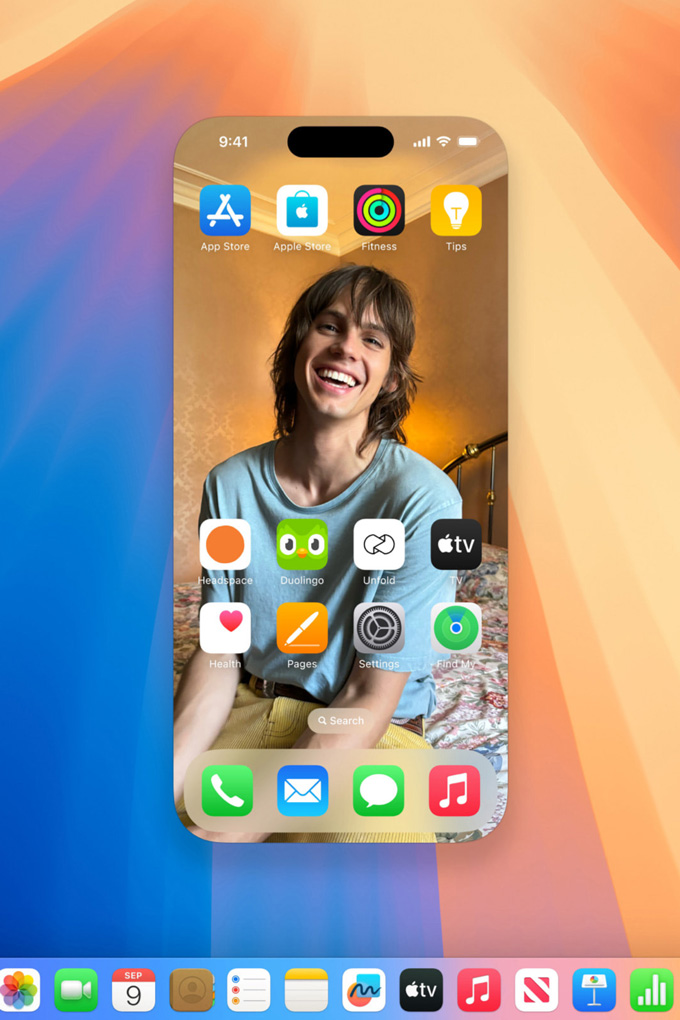
10am: I arrive at the office and make sure the set-up I put in place from the previous evening is all in order. That means both my devices—the iMac at my work desk and my iPhone 15 Pro—have been updated to the latest MacOS Sequoia and iOS 18 respectively. The iPhone Mirroring app now appears in my Dock and I can connect the two devices as long as both Wi-fi and Bluetooth are enabled. A few clicks later and I’m in. This feels like Inception, only instead of dreams, it’s a screen within a screen.

11am: I’m taking my time to get used to the flow of things. Every time I’ve got the urge to look at my phone, I realise I don’t have to lift a finger. One click and the iPhone Mirroring app reconnects me to my mobile on my iMac screen. I’m still playing around with the size of the screen on my mega-sized iMac screen. The bigger, the better for me, and that can be arranged with ease in the View settings.
12pm: It’s time to prepare the second social media posting for Vogue Singapore’s Instagram. It’s the Cannes Film Festival season, and we’re doing a red carpet round-up for the premiere of Paul Mescal’s History of Sound. A video of his current beau—Gracie Abrams—is the opener to a carousel of images. With my caption done and images procured from the Internet, it’s time to port everything over to my mobile. This usually involves a combination of Airdrop and texting captions to myself. Instead, all I have to do is drag and drop my media from my iMac into my iPhone directly, access Instagram from the Mirroring app, and upload the post as if I was holding my phone right in front of me. Technically, my mobile is right in front of me. There just hasn’t been any need for shifting devices, or any seconds wasted in unlocking my phone to Airdrop images. Time is of the essence, and the app gets it.
230pm: We’re done with lunch and back at our desks. I notice my mobile is in need of a charge, so I plug it in at our desk’s main charging area and let my iPhone rest behind my screen. Soon enough, someone brings up the office’s returning question of the day: “Are we getting coffee?” It’s a resounding yes, and it falls on me—the one with a Grab Unlimited account—to get an order going. I swipe to the Grab app on my Mirroring app and start a group order to send to the group chat. No need for any unplugging of my phone from the charging cord, or any of that messy business. With a whole ten-metre radius for the Mirroring app to function, I can rest easy knowing I could be charging my mobile on the other side of the room and still interact with my phone from my work desk.

4pm: I get a notification—from my iPhone, but on my desktop—from my language learning tutoring app, Preply. It’s my Korean language teacher requesting to change our lesson timings for the upcoming week. Switching language keyboards isn’t available on iPhone Mirroring just yet—but no matter, I type out my reply on my desktop and seamlessly paste it into the Preply chat page in order to reply to her in Korean.
5pm: I’m accessing X via iPhone Mirroring. I don’t usually like looking at the app from my Mac desktop because the screen feels too big and I would prefer for my K-pop shenanigans to not be displayed to the whole office behind me. With iPhone Mirroring barely taking up a sixth of my iMac screen, it’s a comfortable (and more guilt-free) size to be checking out what the latest fandom updates are.
6pm: Am preparing for another post that will go up in the next hour or so—when I’m on the way home. Since I’ll be posting it on-the-go, I’m dropping the images into my mobile, and making sure my Notes app is synced up so that my caption will be easily accessible at 7pm later.
7pm: I’ve logged off and left the office, and am using my physical iPhone again. I’ve just uploaded the Instagram post, and can now do some of the more personal to-dos I’ve been delaying for a while now. I open my Photos app and use Apple Intelligence to organise a Memory Movie of old photos with Kitty, my feline companion—from selfies to photos of when she was still a kitten.


Learn more about Apple Intelligence here and Apple’s Continuity features here.